![GTR Logo-01-n-text-white-2.png]](https://knowledgebase.getthereferral.com/hs-fs/hubfs/GTR%20Logo-01-n-text-white-2.png?height=40&name=GTR%20Logo-01-n-text-white-2.png)
Sales reps receive referral bonus payments inside the GTR App Wallet. Transfers to your bank account are managed in your sales rep app and processed through our secure payment partner XTRM.
Your transfer limits depend on how complete your XTRM profile is. To access the highest weekly transfer limits, your account must reach the Advanced (Green) Identity Level.
|
Identity Level |
Profile Status |
Requirements |
Transfer Limits |
|
Basic (Blue) |
Partial profile |
First & Last Name |
$2500 Daily $5000 Weekly |
|
Standard (Orange) |
Verified profile |
Name + DOB + SSN + Full Address |
$5000 Daily $10,000 Weekly |
|
Advanced (Green) |
Fully verified |
Complete all Identity fields(includes Photo) |
$10,000 Daily $25,000 Weekly |
How to Unlock the Highest Transfer Limits
- Log into your XTRM account
- Select Identity from the left menu
- Complete Personal and Contact sections
- Add SSN, Date of Birth, and full home address, and Upload Photo Documentation(as prompted)
- Confirm account shows Advanced (Green) and 100% completion
How to Log Into Your XTRM Account
- Go to https://www.xtrm.com
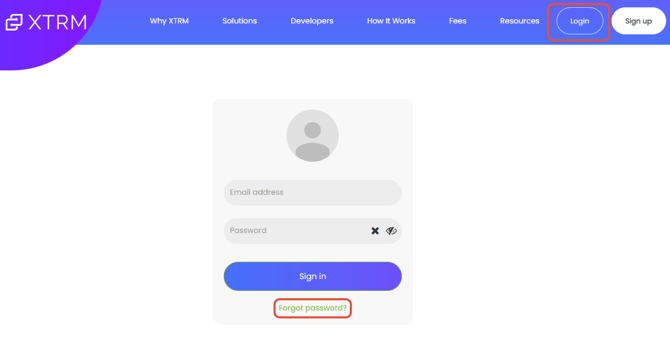
- Click the Login button in the top right corner of the page
- Enter the same email address and password you use for your GTR account
- If you cannot remember your password, click 'Forgot password?' on the login screen to reset it
Important: Payments will appear in your GTR App Wallet. If your XTRM profile is incomplete you may encounter weekly transfer limits when moving funds to your bank account.
How Sales Reps Transfer Funds to Their Bank Account
- Log into the GTR App
- Tap the My Wallet button
- Enter your password for security
- Tap Link Bank (big blue button at the top left)
- Enter the required banking information (all fields marked *)
- Tap Create Recipient
- Your bank account will now be linked and available for transfers from your wallet